Test report film scanner Reflecta CrystalScan 7200
In February 2005 Reflecta launched the Crystal Scan 7200 a follow-up model for the proven CrystalScan 3600. I'm saying proven, because the Crystal Scan 3600 was the first low cost filmscanner on the market which produced scans in good quality using the ICE dust and scratch correction technology. Thus for the first time a functionality was available for starters, that until then was reserved only for professional, expensive devices.
The Crystal Scan 3600 was already considered good due to a high effective resolution of approximately 3300 dpi; that's a high value based on the nominal resolution of 3600 dpi. The follow-up model Crystal Scan 7200 now suggests a sensational resolution of 7200 dpi to the user. It is to be considered however, that the optical resolution remains at 3600 dpi; only the step-size of the stepping motor got halved, so that in transportation direction 7200 dpi are achieved. That's however only little useful to the user, particularly since an effective resolution of 3300 dpi is completely sufficient for the scanning of 35mm films.
So nearly nothing has changed in comparison to the predecessor model. The new CrystalScan 7200 is offered for practically the same price as the old model. The handling and the characteristics are similar. Like with the predecessor model, manual work is necessary operating the CrystalScan 7200, meaning there is no automatic film transport. Slides must be inserted individually and film strips have to be placed manually into the correct position. But the user receives a very good device with ICE dust and scratch correction, film grain smoothing and ROC color restoration.
Equipment, accessories and technical facts of the filmscanner
With the Reflecta CrystalScan 7200 one receives a complete package for the scanning of framed slides and film strips at a sensationally favourable price. Scannable are positives and negatives, colour pictures and black/white pictures – so practically any 35mm film material. The CrystalScan 7200 works without additional adapters, meaning framed 35mm slides or film strips are inserted directly into the scanner; one doesn't need additional adapters or film holders, which means there are no wearing parts.
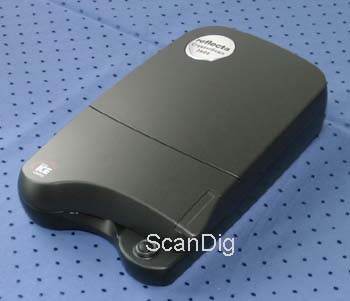
The scanner is delivered as complete package. This includes all connecting cables, scanning software and of course a manual. So whatever is needed for the digitization of 35mm slides or negatives is included - I believe that's praiseworthy for a scanner in this low price segment.
The Reflecta CrystalScan 7200 is a very compact film scanner with the small measures 278 mm x 169 mm x 70 mm; so it's smaller than a sheet of paper and weighs just 1 kg. The small outline is possible, since the scanner doesn't need any transportation for film strips. With this we're already talking about the main characteristic of the CrystalScan 7200: contrary to its competitor from the same company, the RPS 7200 Professional (see my test report), the CrystalScan doesn't pull in film strips automatically and thus can't scan a whole negative strip in one shot. The user must insert the film strip manually and position the picture which he wants to scan on the glass holder. You can imagine, that this costs a lot of time and work.
Anybody who doesn't mind this manual work, receives a good film scanner for the money: The CrystalScan digitizes 35mm film material with a resolution up to 7200 dpi and is even able to produce image files with 48 bits color-depth. The maximum density is 3,2; the density of the scanner is thus below 3. Those values are of theoretical nature and can't be reached in practice, that's something what I've determined with numerous other film scanners too, so it doesn't come as a surprise to me. A white and an infrared LED row are used as sources of light. The infrared ray is needed for the ICE dust and scratch correction procedure: The source of infrared light scans the inserted picture for unevenness (scratches, finger marks, dust particles) and enables the scanning software to correct the recognized errors. To the ICE³ procedure, which is integrated in the CrystalScan 7200, belongs the ROC color restoration, which helps old and yellowed pictures to regain new freshness, as well as the GEM film grain smoothing procedure.
The scanner has a fast USB 2.0 interface, which makes the fast transmission of large data sets, which one receives with the maximum resolution of 7200 dpi, possible. An USB 2 cable is also included in the delivered supply.
Installation and starting
When purchasing a reflecta Crystal Scan 7200, one notices first a small and handy cardboard-box with carrying handle – having everything included: scanner, power supply, USB cable as well as CyberView software; each in a whole number of different languages. Also included is a small manual in german and numerous other languages. On the 20 pages it understandably explains, how to install the scanner to a certain computer with a certain operating system and how to make the first scan.
First we nstall the scanning software. A sticker at the back of the scanner is giving the warning, not to switch-on the scanner, before the installation is done. Exemplary! Who nevertheless doesn't pay attention to the sticker, receives a message from the installation program, saying that the scanner may be switched on only after the software installation. Actually nothing should go wrong here. Normally I would hold against the scanner that the power switch is positioned at the back of the device; thus one must always fiddle along the device until the button is finally found, but I think that's something one can live with - considering the small size of this device.
My installation under Windows XP was done in a few minutes; afterwards the film scanner could be connected and the first scan could be made.
Scanning framed slides
To me, scanning framed 35mm slides is simple: First one opens the scanner cover to push a small button which opens the integrated film holder flap. Then one inserts the slide, pushes it up to the stop and closes the film flap by simply pushing until it clicks-in. The film holder cover has an integrated spring, which keeps the inserted slide firm in its position. Then one can start to scan (preview, make adjustments, start main scan).
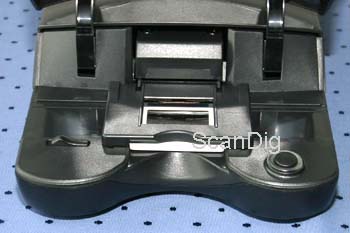
This sounds easy, fast and comfortable; and indeed one needs only a few moves, in order to remove a just scanned slide and insert the next. Inserting is a safe affair, because of the fact that one does not run the risk to touch the film layer by mistake, since one can hold the slide comfortably at the frame to push it in and/or to pull it out.
After just a few or after hundreds of slides, the constant opening of the protective cover, the unlocking of the film holder flap and opening of it, nevertheless becomes a burden - less because of the time needed for it, than rather because of the fuss and the number of moves, above all if one knows how inserting slides works with other scanners, for example with the Reflecta RPS 7200 (see my test report about this device): Insert the slide simply in the slot at the front of the device and that's it. To remove it just press a button. That's where one notices that with a CrystalScan he enjoys less comfort than with some other film scanners. I don't even like to think about batch scanning framed slides in a 4- or 5pcs. slide holder! It is obvious that the covers wear out more and more if you scan a lot if mounted slides. However, the CrystalScan 7200 is not designed for scanning big amounts of mounted frames.
Nevertheless the CrystalScan7200 beats some more expensive competition models with the scanning of framed slides: slides with almost arbitrary thickness can be placed on the scanner. The double-glass-framed slides with more than 3mm can be placed on the scanner and positioned firm with the film holder flap without trouble; on such thick parts some other scanners with a film holder fail. Also inserting extremely thin slides is no problem at all.
| Procedure |
Duration |
| Scanner calibration |
0:12 min |
| Preview |
0:17 min |
| Scan with 3600 dpi resolution |
1:45 min |
| Scan with 3600 dpi resolution (ICE on) |
2:40 min |
| Scan with 7200 dpi resolution |
3:55 min |
| Scan with 7200 dpi resolution (ICE on) |
7:45 min |
To the above Scan times has to be mentioned, that I always have optional functions such as autoexposure or automatic focusing switched on. I consider scanning times for minimum adjustments not very meaningful. The scanning times increase, as well known, when more corrections and filters are switched on.
With the Reflecta CrystalScan 7200 usually one scans with 7200 dpi resolution and ICE on, and additional filters active. So the average scanning time increases to more than 10 minutes. That's a verly long time! Even if you change the mounted slides quickly, you make just 5 or 6 slides per houer. For a complete slide magazine you are busy for many evenings or even lots of weeks. In case of scanning speed the Crystal Scan is a slow scanner - not recommendable.
Peoply who want to digitize a couple of mounted slides again and again, will get along with the CrystalScan 7200 well. For digitizing a complete collection of mounted slides (e.g. more than 1000 slides) the device is not recommendable. It just takes took long!
Scanning film strips, film rolls and single pictures
Scanning 35mm film strips works basically exactly like scanning 35mm slides: one opens the scanner cover, unlocks the film holder flap, opens it then carefully and pushes the negative strip over the preview window. Since the glass plate is always a little bit lit from below, the exact adjustment of the film strip is easy. Nevertheless this is the point where I noticed the biggest difference to most other film scanners: the negative or positive strip (both can be processed) is not pulled in automatically or accurately adjusted in a
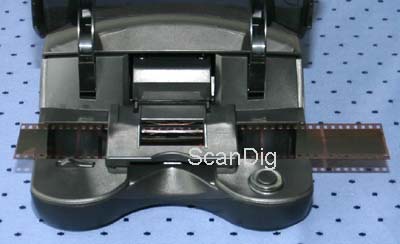 film holder, which is then being pulled in; no, the film strip must indeed be manually inserted and the picture positioned accurately over the film stage for scanning. That's of course uncomfortable and time-consuming, but I already mentioned in the introduction, that using the CrystalScan some more manual work is needed than with other film scanners.
Nevertheless manual inserting of film strips has also an advantage: the CrystalScan 7200 is one of the few scanners on the market, which can process film rolls of any length. The surplus of the film roll is simply hanging over on the left and on the right side of the scanner. However, this speciality is not of interest for most of the buyers of this scanner.
Inserting the film strips is however always risky, because it carries the permanent danger that one could leave fingerprints on the film, especially if one processes short film strips or single pictures. In this case I absolutely recommend to wear cotton gloves and to use special tweezers with flattened tips. It would be certainly too bad if the film strip would become dirty or even destroyed right before the last usage.
When digitizing entire negative strips, of course one misses an automatic pull-in as well as the possibility of processing the whole film strip in batch mode. Whoever wants to digitize larger quantities of negative strips, must be aware of the time and effort required for each individual picture.
Film strips which are curled, curved or concave make big problems. That's often the case for film strips as you get them from the laboratory. Since the film strip cannot fixed firmly, this compulsorily leads to unsharp scans, and you cannot do anything against it with this scanner. That's a big deficiency, since you cannot press a curled or curved film strip, even if you use heavy books.
| Procedure |
Duration |
| Scanner calibration |
0:12 min |
| Preview |
0:19 min |
| Scan with 3600 dpi resolution |
2:40 min |
| Scan with 3600 dpi resolution (ICE on) |
3:45 min |
| Scan with 7200 dpi resolution |
4:45 min |
| Scan with 7200 dpi resolution (ICE on) |
8:15 min |
To the above Scan times has to be mentioned, that I I always had optional functions such as autoexposure or automatic focusing switched on. I consider scanning times for minimum adjustments not very meaningful. The scanning times increase is well known, when more corrections and filters are switched on. Scanning times for a negative are of course longer than for a positive, which is normal with all scanners.
The above times were achieved on a Pentium IV with 3 gigahertz clock frequency and 2 gigabyte main memory, using an USB 2 connection; with a USB 1 connection the scanning times clearly increase.
Film strips are normally beeing scanned with 7200 dpi and active ICE with this scanner. If you add further correction filters the scanning times increase to more than 10 minutes per frame. Since you need additional time for the exact positioning of the film strip and the pre scan you will make just one scan in about 15 minutes. The Reflecta RPS 7200 digitizes a film strips with 4 frames in about 20 minutes, and does this fully automatically. A professional scanner like the Nikon SuperCoolscan 5000ED does this job within 5 minutes in the automatic batch mode! If you want to scan a larger amount of negatives on film strips, I cannot recommend you the Reflecta CrystalScan 7200. The work is extremely time consuming and exhausting.
Due to the very long scanning times and the extensive handling the Reflecta CrystalScan 7200 is not suitable for digitizing a complete collection of negatives. Just think that scanning a film with 36 frames takes about 9 hours! That's why this scanner is much more made for scanning a couple of negatives occasionally.
Scan software for the Reflecta CrystalScan 7200
Reflecta delivers the CrystalScan 7200 with a self made scanning software-package CyberView. Optionally there is the scan software SilverFast from the German manufacturer Lasersoft Imaging available. SilverFast is available in different versions: SE, SE Plus, Ai Studio and Archive Suite. In the following chapters we describe the different software versions for the Reflecta CrystalScan 7200.
Scan-Software CyberView
Regarding the CyberView X software, I must say it runs extremely well and didn't crash even once during my test phase; this is not to be taken as granted for scanning programs. It's clear that a professional scanning software can't be expected in a film scanner of this price segment. So what offers the CyberView X software if used with the Reflecta CrystalScan 7200?
The program is very clearly structured and not overloaded with buttons and controllers. One gets along with the user surface quickly and even a beginner in the field of scanning can very swiftly achieve his first scan. Those who need a manual can make themselves more knowledged by either reading the included 20 page manual or use the PDF-Version, which is also the online help.
In the scanning software the exact type of film or just a generic film can be defined; thus some color profiles are accommodated in the software, so that one receives better colors, if one sets the film type accurately? The adjustments for resolution and scanning area can be very easily made in the software. However with each restart of the software one has to start all over again.
Some user dialogues are unfortunately not completely simple to understand. For example when adjusting ROC color restoration one has to click on "accept" before clicking on "close", that's very unusual for most Windows users; a simple Ok button is far more common. The software has a few small weaknesses just like this example. But the software also has some strengths, which I wouldn't have expected: its offering (apart from the usual color corrections, such as brightness and contrast) the possibility to change the gradation and hue curves. That's not commonly found in a simple scanning software. Also noticeable is that one can set several scan areas within a picture, so that these get automatically numbered and scanned one after another; so far I only know this feature from the professional software SilverFast.
The automatic file numbering is very practical, if scanning a series of pictures. However this feature is not perfectly developed yet, because the counter needs to be readjusted manually from time to time. The dialogue handling is also not really good yet: for example if scanning with 7200 dpi resolution, the progress bar makes one believe how the procedure is progressing and after reaching the 100% the bar disappears. This seems as if the scan is done, but after a longer moment a new progress bar appears and a new progress bar starts. This way one never really knows when the scan is really finished.
Altogether CyberView X captivates by its clarity and simpleness. The software has some small weaknesses, but also some strengths. For a film scanner in this price range the software is however sufficient and acceptable. Beginners are aquainted with this software very quickly; more sophisticated users achieve the limit very quickly, since the software just offers too few adjustment possibilities in order to achieve good scans.
A good improvement for the Reflecta CrystalScan 7200 will be achieved if you use this scanner with the SilverFast Scan-Software, see the following chapters.
Scan-Software SilverFast SE 8
For a small surcharge you get the CrystalScan 7200 with the Scan-Software SilverFast SE. SilverFast SE is a flattened version of the professional Scan-Software SilverFast Ai Studio from Lasersoft Imaging. Even if SilverFast SE is only a light version of the professional version, it offers much more setting possibilities than reflectas scanning software CyberView, yields a significant better image quality and offers a better handling to the user. Lasersoft Imaging has been developing this scanning software for many decades. The image processing algorithms are so good and perfected that they bring out just more from the scanner then any other scanning software.
SilverFast SE yields so many advantages compared to the standard scanning software that we recommend to the bundle with SilverFast SE by all means when buying a reflecta CrystalScan 7200.
The feedback of numerous customers confirms this year for year. The improvement in case of handling and image quality, which one gets for a simple surcharge, is really considerable. There is more information to the SilverFast software on our FAQ pages about SilverFast.
Scan-Software SilverFast SE Plus 8
There is also a Plus version of the above described and recommended scanning software. The main difference between these two versions is, that the SE Plus version supports Multi-Exposure. That means, that a positive or a negative is beeing scanned twice with different exposures; from the two scans an optimal image is beeing computed afterwards. By using multi exposure one achieves a significant improvement of the image quality at many originals.
Multi-Exposure is a feature which has only positive effects on scanning. As owner of SilverFast SE Plus one usually acivates Multi-Exposure for every scan. For many slides it provides a significant increase in the contrast range and therefore a better image quality. For other slides it just has no effect.
Detailed information and examples to multi exposure can be found on our SilverFast website in the chapter Multi-Exposure. The surcharge of the SE Plus version compared to the SE version is only about 40 € however, this amount is worth the money!
Beginners and advanced users achieve good results with the Reflecta CrystalScan 7200 in combination with the SilverFast SE Plus 8 Scan-Software. The improvement compared to the reflecta standard scanning software is considerable!
Professional Scan-Software SilverFast Ai Studio
These guys who want to achieve best possible scan results with the Reflecta Crystalscan 7200, should buy this scanner with the professional scanning software SilverFast Ai Studio from Lasersoft Imaging. Lasersoft Imaging has been developping this Scansoftware for many decades and can proudly call themselves world leader in the field of scan software.
SilverFast Ai Studio is a professional scan software with numerous setting options for very good scans. Professional tools like gradation curves or tonal value settings or numerous filters, as you know them from Photoshop®, are included in SilverFast Ai Studio. SilverFast Ai Studio distinguishes itself furthermore by extremely good image processing algorithms, which achieve much better results from the scanner then any other scan software. Also the above described multi exposure function is included in SilverFast Ai Studio.
The main advantage of SilverFast Ai Studio, however, is the IT8 colour calibration feature. With the help of a IT-8 target the scanner will be calibrated concerning colours, so that it yields natural, true colours. Whilst you have to postprocess each scan from a non-calibrated scanner, you can do without this step when using a calibrated scanner, since colour errors of the scanners are corrected once. Instead of correcting the colours of 1000 scans in the image editing program after scanning, this is done once at a time with the help of the IT-8 colour calibration. Of cours this saves a lot of time and nerves. There is more information to the SilverFast software on our FAQ pages about SilverFast.
SilverFast Ai Studio distinguishes itself by the IT-8 colour calibration, professional setting options and a significant improvement in the image quality. The software can be recommended to everyone who puts much importance to good image quality.
The scanning software SilverFast Ai Studio costs about the same as the scanner CrystalScan 7200 itself. However, the combination of a low-price scanner with a professional scan software is better than the combination of a good scanner with a bad scan software. In our online shop you may order the Reflecta CrystalScan 7200 in a bundle with SilverFast AI Studio.
Conclusion concerning scanning software
The Reflecta CrystalScan 7200 in combination with the scan software CyberView is not recommendable, as we will also see in the following chapter image quality. For a small surcharchge one gets the Crystal Scan 7200 with the very good scan software SilverFast SE, so that one gets a good bundle consisting of scanner and software in total. For a small additional surcharge there is the software SilverFast SE Plus available, which provides a significant better image quality thanks to the multi exposure feature. Of course the best solution is the AI Studio version of the SilverFast scan software, especially because of the IT-8 colour calibration. However, the total price increases drastically.
Finally we come to the recommendation to operate the Reflecta CrystalScan 7200 with the scan software SilverFast SE Plus. One gets a very good scanning software, which is easily to handle, which provides a considerable increase of the image quality, and furthermore leads to an increase in the scanning speed.
In our online shop there is the Reflecta CrystalScan 7200 with SilverFast SE Plus available in a low-prized bundle.
The image quality of the Reflecta CrystalScan 7200
Let's talk about the most important point, the quality of the scans. With a resolution of 7200 dpi and a 48 bit color depth it should be possible to make very good digital images. First I must praise that reflecta indicates the maximum density Dmax with 3,2. That's a honest value, which is sufficient for many applications, but leads to losses for many images, too. Still I'm praising it, because most manufactures nowadays ony indicate the theoretical density value of 4,8; thus a value originating from maximum color depth and the A/D transformation process.
Of course I was dying to to see what resolution the reflecta Crystal Scan 7200 really yields and whether the halfed stepwidth of the transportation really affects the resolution positively. The scan of a USAF test chart intends to show, how many dots per inch are effectively produced. If we look at the USAF test chart, then we can state that all elements of group 5 are shown clear, meaning those three horizontal and vertical black bars are contrasting very good against the white background.
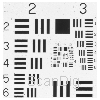 Looking at element 6.1, we can still see clear contrast between the three bars and the grey between them. In element 6.2 there are however only completely fine, vertical contrast differences visible, which is the transportation direction. The halved stepwidth in transport direction thus leads to at most 100 dpi more when compared with the predecessor model.
Element 6.1 corresponds to a resolution of 3251 dpi; element 6.2 to 3649 dpi. So I conclude the result that the scanner has an effective resolution of approximately 3300 dpi, in both, horizontal and in vertical direction. This means we're approx. 10% below the nominal optical resolution - an acceptable and pleasing value, because only very expensive film scanners are in this range of tolerance; lower priced models often reach only 50% of the nominal resolution. However, there's no way to talk of 7200 dpi in transportation direction, so that's a pure marketing trick by Reflecta. This means the device does not differ in resolution from the predecessor model.
In order to achieve the maximum resolution of 3300 dpi one has to scan with 7200 dpi resolution. Such a scan yields an image file with 70 mega pixels, which take 210 Megabyte (even 420 Megabyte when scanning with 48 bit colour depth) on the hard drive. However, from the 70 million pixels there are only 14 millions real, the other 56 millions are double or even double-double. The same holds for the file sizes: From the 210 MB only 40 MB include real information; the remaining 170 MB contain the double pixels. The disadvantage is, that one fills one's hard rive with oversized files and one has to compress the oversized files in an image editing program after scanning. For this process one needs a high end computer and anyway much much time. If one does without compressing the image files after scanning, the digital images are hardly to handle: Who wants to transfer 2 Gigabyte of data if one wants to send 10 images to a friend? Facebook etc. cannot handle such big image files at all. And even the viewing of such big images on the TV or on the iPad is hardly possible, since the loading times are too high.
The Reflecta CrystalScan 7200 has an acceptable effective resolution with 3300 dpi, however, it provides bloated image files, which only can be compressed in a time consuming post process in an image editing program.
If you want to avoid the problem with the bloated image files, we can recommend the Reflecta ProScan 7200. The ProScan 7200 is much faster than the Crystal Scan 7200 and does not deliver bloated image files.
To the evaluation of colors and the color intensity: The maximum density of the scanner is 3,2. This means that the density range of the scanner is about 2,7. One does not need to scan a single frame in order to conclude that the image quality will not be good. A density range of 2,7 is much too small for scanning negatives and slides. In dark image parts (shadows) and bright image parts (sky) there are hardly colours to see. In this case one detects that one scans with a scanner for beginners. If one operates the Reflecta CrystalScan 7200 with the scan software SilverFast SE Plus or SilverFast Ai Studio one can achieve a higher density range thanks to the Multi-Exposure feature.
Unfortunately the Reflecta CrystalScan 7200 does not provide good colours in the normal density range, either. The colours seem unreal and under difficult light situations (e.g. sun set) even surreal. The setting possibilities and correction capabilities in the CyberView Scansoftware are not sufficient in order to obtain acceptable scans. Each scanned image has to be edited in an image editing program. Unfortunately, that is usual for low-priced scaners. A workaround is again the scan software SilverFast in its different versions. Even the simple SE version offers much more setting and correction options in order to control the scan process that way, so that one achieves good image results. The SilverFast Ai Studio version offers a colour calibration before scanning, so that the colour errors of the scanners are beeing corrected and stored in a profile. In this case one saves a lot of extensive corrections after scanning in the image editing program.
Outstandingly good working is the ICE dust and scratch correction for slides and negatives; that's just the big plus of this slide scanner. Dust, scratches, fingerprints or small fluffs are corrected efficiently at expense of the scanning time. The GEM film grain smoothing procedure made me less happy. Applying GEM doesn't only result in flater pictures, it changes the colors too; I assume that GEM is somehow connected to the color restoration ROC, although both correction procedures can be selected and regulated separately.
The Reflecta CrystalScan 7200 provides a rather bad image quality so that each image has to be postprocessed in an time consuming image editing process after scanning.
The Reflecta Crystal 7200 achieves a good image quality only, if it is operated with the SilverFast Scan-Software. Even the simple SE-Version leads to an amelioration in the image quality, since one can set more scanning settings. In order to compensate the low density range of the scanner, the Multi-Exposure Feature of SilverFast is recommended, however this feature is only available starting with the SE Plus Version. A really good image quality can be achieved with the Crystal Scan 7200 only when beeing operated with the SilverFast Ai Studio scan software and if an IT-8 colour calibration is beeing done before scanning. More infos about colour calibration for scanners can be found on our page about Scanner calibration.
In combination with the SilverFast scan software the Reflecta CrystalScan 7200 provides a good image quality.
Since many owners of a Reflecta Crystal Scan 7200 operate their scanner with SilverFast, we offer bundles for the SE / SE-Plus-Version and for the AI Studio-Version in our online shop.
Scanning speed
If one regards the tables with time measurements in the previous chapters, then one will make the usual statements about film scanners: the scanning of negatives takes longer than scanning positives. If one switches on ICE in addition, the scanning time increases considerably. If one adds further filters like GEM or other color corrections, the scanning time continues to increase.
One could expect that the scanning times increase drastically with a resolution of 7200 dpi. Since one usually scans with the highes resolution, in order to achieve the maximum of information from the positive or negative, these high scanning times are relevant. In the practical experience the ICE scratch and dust removal is switched on always (except for black and white films), and further filters normally are set. The time for a single scan is about 15 minutes, inserting and positioning the film and prescan included.
15 minutes for a scan are a very long time, especially since one has to compress and edit the image file after scanning in the image editing software. Considering that one manages just 10 scans at one evening or even only 50 scans on a rainy week-end, then it becomes obvious, that the CrystalScan 7200 is only used for occasional scans of a couple of frames, but not for archiving ones slide or negative collection.
The Reflecta Crystal Scan 7200 is a very slow scanner. It is not suitable for archiving a collection of mounted slides or film strips. Rather it is made for occasionally digitizing a couple of photos into the PC.
A specific increase in the scanning speed can be obtained by the use of the SilverFast software version 8 or higher, since the new SilverFast software uses multi processor systems or several cores of a processsor in order to accelerate the image calculations.
That the scanning times will rise boundless when using 7200 dpi resolution was to be expected. However, scans with 3600 dpi are totally sufficient, since the effective resolution doesn't really increase with 7200 dpi. This way the scanning times remain also within an acceptable range.
The time measurements from above were achieved on a PC with 3 GHz processor frequency and 2 GByte main memory. The scanner was attached to an USB 2.0 interface. Of course the device also works through an USB 1.1 interface, however thereby the scanning times increase because a scan in highest resolution sends approx. 60 MByte data from the scanner to the computer.
Altogether can be said that the Reflecta CrystalScan 7200 is neither a fast sprinter nor a lame turtle; it is to be placed approximately in the medium range of slide scanners. It is much more important that these times apply in each case to only one picture. In each case the time for inserting the slide and/or insertation of the film strip has to be added. Since one can only scan one picture at the time, there is no altermative than to spend a few minutes sitting in front of the computer and to try to keep oneself somehow busy while the scanner is producing the scan. To enjoy the comfort of a cup of coffee while the scanner is processing an entire filmstrip isn't given with the CrystalScan 7200.
Nevertheless the scanning software makes life simple as it for example makes certain standard adjustments and specifies a standard scan area after the preview of a slide; then one only keeps inserting new pictures and pressing the scan button. This permits a somehow fast and effective work.
Warranty
Reflecta limits the warranty for the CrystalScan 7200 to a number of 6000 scan processes. A scan process can be an index scan, a prescan or a main scan. If you choose the option multi-exposure within the scan-software, the film will be scanned twice and the scan counter increases by 2. The same holds for multi times scans. In autumn 2018 this warranty restriction was abandonned by reflecta.
Summary, Result
The Reflecta CrystalScan 7200 is a simple film scanner for beginners and unambitious photographers. Due to its very slow scan speed, its bad image quality and its complex handling it is not suitable for archiving a slide or negative collection but rather for occasionally scanning a couple of pictures.
By operating the scanner with the new SilverFast software version 8 or higher one gets a significant increase in the image quality, and also a gain in scanning speed (depending on the computer). In our online shop there are Reflecta scanners available in different configurations. We recommend the Crystal Scan 7200 as a bundle with SilverFast SE Plus in order to achieve acceptable image results.
Back to the film scanner tests index
|


 Braun Multimag SlideScan 7000
)